AI infrastructure teams are hitting a new reality: performance bottlenecks are no longer just about GPU compute. Increasingly, the limiting factor is how quickly data and models can move through storage systems—especially in cloud environments where object storage dominates.
Whether you're loading multi-billion parameter models for inference, distributing checkpoints across a training cluster, or running pipelines that generate huge volumes of intermediate outputs, the cost of slow storage access shows up immediately in wasted GPU cycles, longer training runtimes, and unpredictable job performance.
With Alluxio AI 3.8, we’re introducing two major new capabilities designed to remove two of the most painful bottlenecks in modern AI pipelines:
- Alluxio S3 Write Cache dramatically reduces object store write latency and improves write-heavy workload performance
- Safetensors Model Loading Acceleration delivers near-local NVMe throughput for model weight loading
Let’s take a closer look at what’s new.
Alluxio S3 Write Cache
AI and analytics pipelines are no longer mostly read-only.
Increasingly, they’re read–write mixed or even write-heavy, generating large volumes of intermediate outputs, checkpoints, embeddings, logs, and transformed datasets. In these environments, write performance becomes just as critical as read throughput.
Unfortunately, backend object storage systems like Amazon S3 were not designed for ultra-low-latency writes at massive parallel scale. Write latency, request overhead, and burst handling limitations often become the dominant factor in end-to-end runtime.
Why Writes Become the Bottleneck
In write-heavy workloads, object storage introduces constraints that are hard to avoid:
- High per-request latency (especially painful for small objects)
- Throughput variability during burst traffic
- Slow read-after-write behavior for pipelines that immediately consume what they write
As more AI workloads rely on rapid iteration loops and continuous pipelines, these limitations can cause major slowdowns.
What’s New in Alluxio AI 3.8
Alluxio S3 Write Cache, introduced in Alluxio AI 3.8, adds optional, user-configurable write-back modes, expanding beyond Alluxio’s existing write-through behavior.
These write-back modes allow applications to write directly to local compute-side NVMe storage, while persistence to S3 happens:
- asynchronously in the background, or
- not at all (when skipping persistence is appropriate)
This effectively decouples application performance from object store latency.
Dramatically Lower PUT Latency (5–8x Improvement)
The impact is immediate and measurable.
For small object writes (10KB PUTs):
- S3 latency: 30–40 ms
- Alluxio S3 Write Cache latency: 4–6 ms
That’s 5–8x lower PUT latency!
For workloads generating millions of small artifacts (metadata files, feature shards, embedding outputs, etc.), this improvement can completely change pipeline performance.
High Throughput for Large Writes (6+ GB/s Per Worker)
The write cache also delivers major gains for large object writes.
For large object writes (10MB PUTs), Alluxio S3 Write Cache sustains:
- 6+ GB/s per Alluxio worker
- low and stable latency
- near-linear scaling as additional workers are added
That means AI teams can scale write throughput simply by scaling Alluxio workers, rather than being limited by the object store write path.
What This Enables
Alluxio S3 Write Cache unlocks major benefits for modern AI and analytics workloads, including:
- Faster checkpoint generation and persistence
- Faster ETL and transformation pipelines
- Improved write-heavy streaming and batch workloads
- Faster read-after-write behavior for iterative AI workflows
- Better burst handling without destabilizing the pipeline
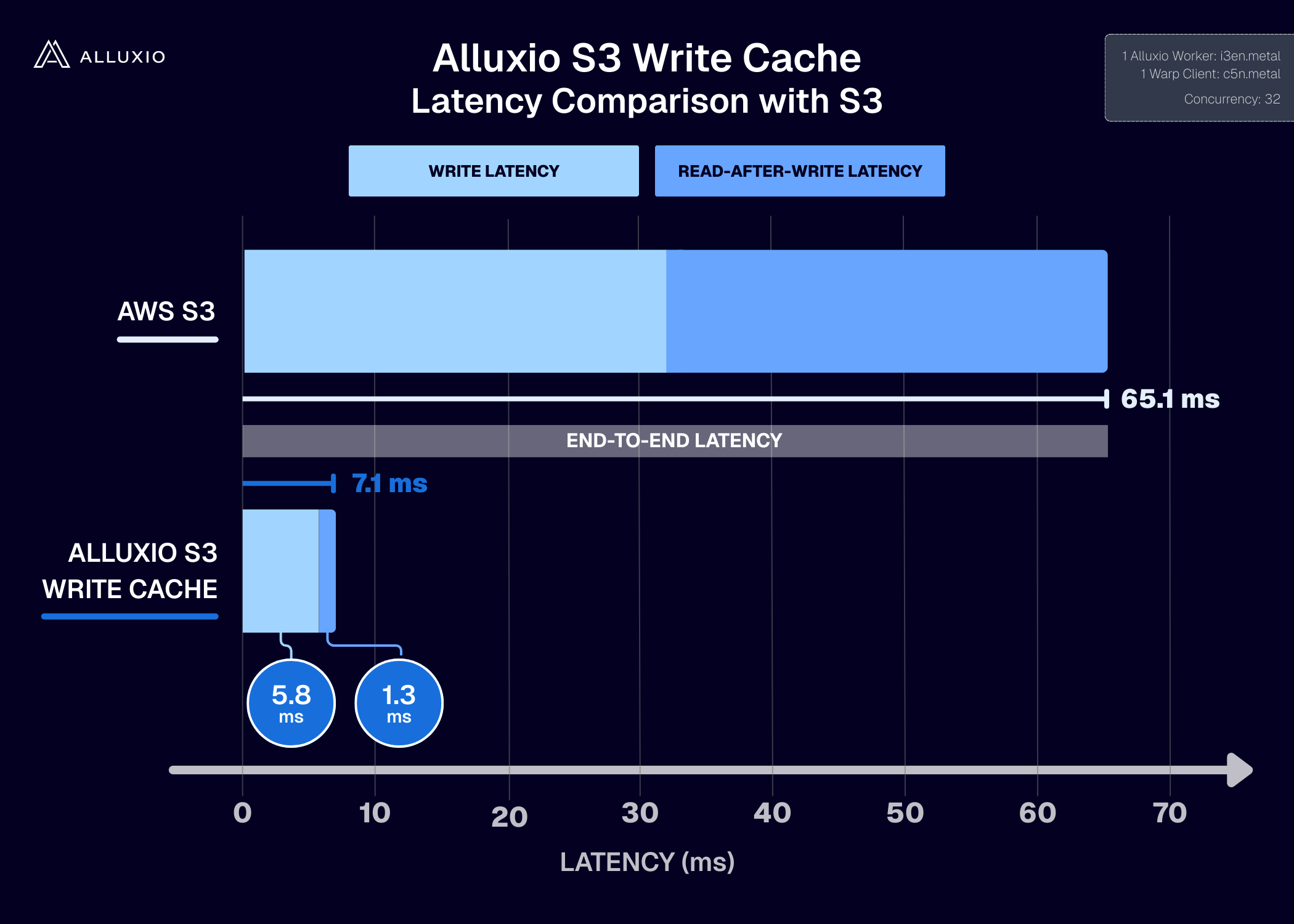
In short: Alluxio S3 Write Cache brings NVMe-like write responsiveness to object-storage-based architectures.
Learn More: Technical Deep Dive on S3 Write Cache
If you want to go deeper into the technical motivation and architecture behind this feature, check out this technical deep dive where Bin Fan explains:
- why write-heavy workloads expose fundamental limits in the object storage write path
- why S3 PUT latency becomes dominant at scale
- how Alluxio S3 Write Cache changes the write and read-after-write latency model in practice
https://www.alluxio.io/blog/alluxio-s3-write-cache
Safetensors Model Loading Acceleration
Large model loading has become one of the most common hidden costs in AI workflows.
It’s easy to overlook because model loading happens “before” the actual training or inference job starts—but in practice, it can take minutes, and it happens repeatedly across clusters and job restarts. In distributed environments, slow model loading can delay entire fleets of GPU nodes from beginning work.
Why Safetensors Matters
Safetensors is an open source model format created by Hugging Face for storing machine learning model weights. It has quickly become the preferred format for many organizations because it solves two major issues with traditional pickle-based loading:
- Performance: Safetensors supports fast, zero-copy, lazy loading
- Security: It prevents arbitrary code execution during load time, making it significantly safer for model sharing
In other words, Safetensors is both faster and more secure—exactly what large-scale AI environments need.
What Alluxio AI 3.8 Adds
Alluxio AI 3.8 introduces Safetensors model loading acceleration, designed to make loading large Safetensors-based models fast and stable in the cloud, even when the source model lives in object storage.
With this capability, Alluxio AI delivers throughput at near local NVMe speed, enabling model load times that complete 15–20x faster than popular cloud storage solutions like AWS FSx Lustre.
Benchmark Results: 18x Faster Than AWS FSx Lustre
In internal benchmarks using the DeepSeek-R1-Distrill-Llama-70B model (~130GB), we measured model load time from cloud storage environments:
- Alluxio AI: 49 seconds
- AWS FSx Lustre: 900 seconds
That’s a breakthrough improvement of 18x faster model load times.
This kind of acceleration is especially impactful for inference clusters that frequently scale up/down, training workflows that restart jobs often, or any environment where model loading is repeated across many nodes.
What This Enables
With Safetensors model loading acceleration, AI teams can achieve:
- Faster time-to-first-token for inference deployments
- Faster training job startup and restart cycles
- Higher GPU utilization by eliminating idle time during model initialization
- More predictable performance across cloud environments
Alluxio AI 3.8 makes Safetensors-based model loading not just fast, but cloud-ready at scale.
Summary: Alluxio AI 3.8 Removes Two Major Storage Bottlenecks
Alluxio AI 3.8 is built for the reality of modern AI infrastructure: cloud-based models and data pipelines at massive scale, where storage latency and throughput directly translate into GPU waste and slower innovation.
With this release, we’re introducing two major new capabilities:
Alluxio S3 Write Cache
- New configurable write-back modes unleash local NVMe performance
- Small object PUT latency drops from 30–40ms → 4–6ms
- Large writes sustain 6+ GB/s per worker, scaling near-linearly
Safetensors Model Loading Acceleration
- Near-local NVMe throughput for Safetensors model loading
- 15–20x faster load performance compared to popular cloud storage solutions
- Benchmark result: 49 seconds vs 900 seconds (18x faster than AWS FSx Lustre)
Together, these features enable faster training startup, faster inference deployments, faster pipelines, and better overall GPU utilization—while keeping object storage as the system of record.
Alluxio AI 3.8 makes cloud-based AI infrastructure significantly faster, more predictable, and more scalable.
Ready to take your AI infrastructure to the next level? Take the first step by connecting with one of our experts.
.png)
Blog

Alluxio’s MLPerf Storage v3.0 results demonstrate that organizations can keep persistent AI data in Amazon S3 while delivering high-performance training and checkpointing through a distributed cache close to compute. Alluxio achieved 147.03 GiB/s checkpoint write bandwidth for Llama 3 405B and near-linear scaling from one to 32 workers.